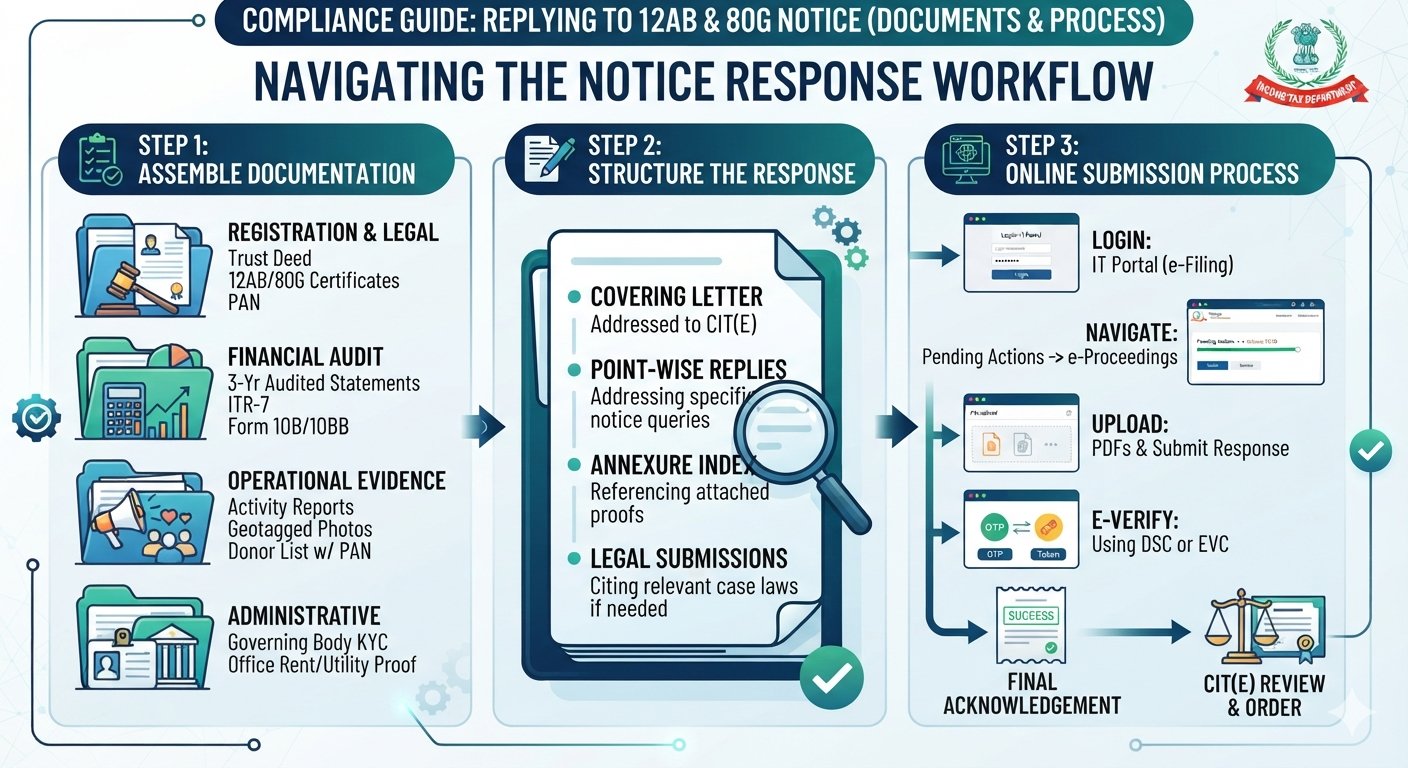
"A compliance guide outlining the mandatory documentation and digital submission steps required to respond to an Income Tax notice under Section 12AB and Section 80G. It details the four critical document categories (Legal, Financial Audit, Operational Evidence, and Administrative proofs) alongside a 3-step online filing process to successfully submit the reply via the e-Filing portal, prevent tax-exemption cancellations, and secure an official CIT(E) order."
Did you know that the Income Tax Department cancels nearly one third of trust registration applications because of incomplete documentation during the notice stage? When you receive a notice regarding your 12AB or 80G application, you must act within the specified timeline to maintain your tax-exempt status - this communication is not a rejection but a request for clarification that requires a precise technical response.
The tax authorities issue these notices to verify that your organization operates for genuine charitable purposes. You are responsible for proving that your activities align with the objectives stated in your foundation documents. Failure to address these queries results in the automatic rejection of your tax benefits.
Understanding the Notice for 12AB and 80G Registration
A notice under Section 12AB or 80G is a formal inquiry from the Commissioner of Income Tax (Exemptions) - this letter typically asks for evidence regarding the nature of your charitable activities and the source of your funding. Officials examine if your institution spends its income exclusively on the goals mentioned in your trust deed.
The department uses this scrutiny to prevent the misuse of tax exemptions by entities that do not perform social welfare. You must review the specific "Point of Query" mentioned in the digital notice. Each point requires a separate, factual explanation backed by physical or digital proof.
Essential Documents for Your Official Response
Your response is only as strong as the evidence you attach to the portal. Many notices require you to provide a detailed narrative of the projects you completed in the last three financial years. You should ensure that all PDF files are clear and under the maximum size limit allowed by the tax portal.
Prepare the following records to support your submission
- Activity Reports Summaries of programs conducted, including dates, locations and the number of beneficiaries.
- Financial Statements Audited balance sheets and income expenditure accounts for the preceding three years.
- Bank Records Statements that show the flow of donations and the payment of operational expenses.
- Trustee Profiles Identification proofs and contact details of all current board members.
You must also include photographs of your charitable events and copies of any brochures or pamphlets your organization distributed. If you own or rent an office, provide the utility bills or lease agreements to prove your physical presence. Accurate record keeping is the most effective way to satisfy the assessing officer.
Steps to Submit the Reply on the Income Tax Portal
The submission process is entirely digital through the "e-Proceedings" tab on the official income tax website. You log in using your Permanent Account Number (PAN) and navigate to the pending actions section. You find the specific notice number and the option to submit a response.
Follow the steps to complete your submission
- Select the relevant notice and click on the "Submit Response" button.
- Type a brief cover letter in the text box explaining your organization's mission.
- Upload the requested documents as individual attachments.
- Verify the submission using an Electronic Verification Code (EVC) or a Digital Signature Certificate (DSC).
Check the "Submission Status" after you finish to confirm that the portal accepted your files. You should download the acknowledgment receipt for your internal records. The tax department usually processes these responses within 15 - 30 days of the submission date.
Reasons for Receiving a Query from Tax Authorities
Authorities often issue notices when the objectives in your trust deed are too broad or vague. If your expenses do not match the charitable goals you claimed, the officer will ask for a detailed breakdown of costs. Discrepancies between your reported donations and the names of donors also trigger these inquiries.
You might receive a notice if you failed to file your annual returns (Form 10B or 10BB) in previous years. The department also flags organizations that receive high amounts of anonymous cash donations. Ensuring your internal accounting is transparent helps you avoid the complications in the future.
FAQ
What is the deadline for replying to a 12AB or 80G notice?
The deadline is usually 15 days from the date the department issues the notice. You can find the specific "Due Date" listed on the first page of the document.
Can I request more time to submit my response?
Yes, you can submit an adjournment request through the e-proceedings portal. You must provide a valid reason why you cannot meet the original deadline.
What happens if I ignore the notice?
If you do not respond, the Commissioner will reject your application for 12AB or 80G registration - this makes your organization's entire income taxable at the maximum marginal rate.